


Home by ShowingTime
3.42.01K Reviews
App Specs
- Version
- 2.3.7
- Updated On
- License
- Free
- Downloads
- 500,000+
- Developer
- ShowingTime
- Categories
- House & Home
- Platform
- Android, iOS
Screenshots

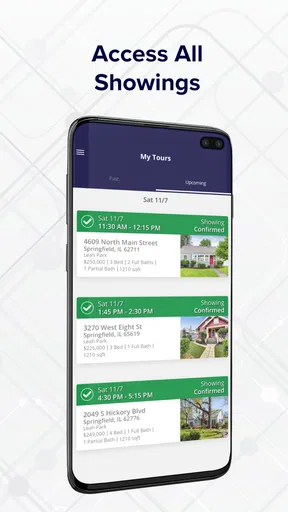
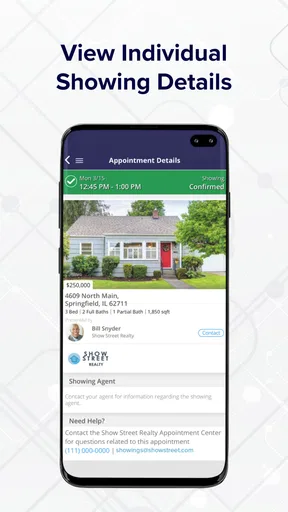
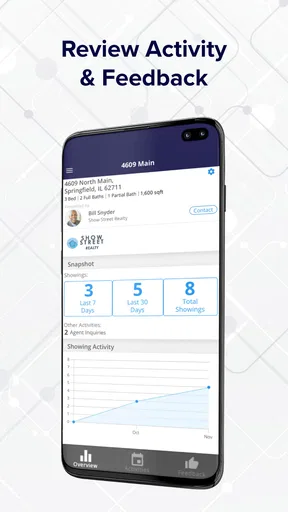
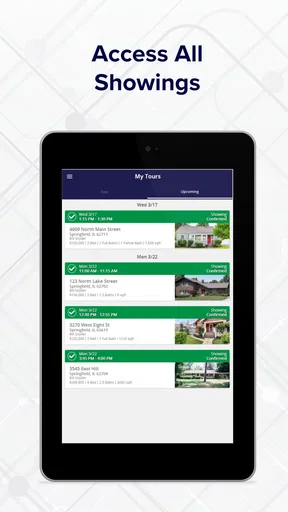
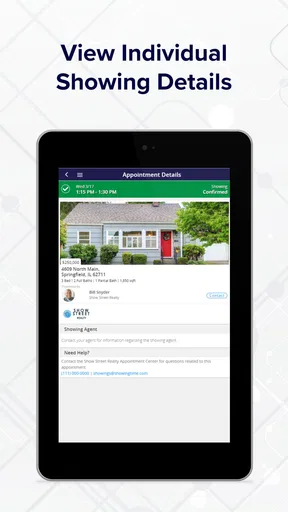
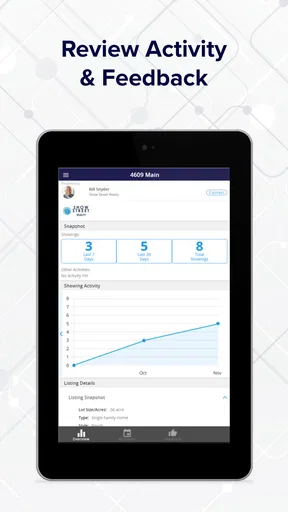
 Analysis by AppCompare
Home by ShowingTime is best understood as a practical coordination tool for people arranging property tours, rather than a general-purpose home app. I’d consider it when showings, schedule changes, and post-visit impressions are getting scattered across calls, messages, and calendar notes. Its focus is useful precisely because it keeps the house-hunting workflow in view; it is less compelling if you only need a place to browse listings or manage a household.
Where a showing-focused app earns its place
The value of a dedicated showing app becomes clearer when several people are involved. A buyer may be coordinating with an agent, fitting visits around work, and trying to remember which home had the bright kitchen or the noisy street. Keeping scheduling and feedback in one place can reduce the mental bookkeeping that comes with that process. I’d treat it as a shared workspace for the visit itself, not as a replacement for every tool used during a move.
That distinction matters when choosing between this and the usual alternatives. A calendar is flexible, but it generally depends on someone entering and updating each appointment. Text messages are quick, yet details can disappear among unrelated conversations. A notes app is good for personal impressions but does not organize the tour around the showing. Home by ShowingTime brings those tasks closer together, which is its strongest practical argument; people who already have a dependable system may not gain much by adding another app.
A realistic day of house hunting
Imagine that I have several properties to visit after work and one appointment shifts. Instead of keeping the original time in one place, the agent’s message in another, and my notes somewhere else, I can use the app as the central reference for the showing process. After each visit, I can record an immediate reaction while details are still fresh. That is more useful than trying to reconstruct the day later from vague memories such as “the second one had better storage.”
A small habit makes that workflow more effective: I would write notes in a consistent pattern, such as one line for what worked, one for a concern, and one question to follow up on. The app can help keep feedback tied to a viewing, but it cannot decide which trade-offs matter to me. A brief, repeatable note format makes comparisons more grounded and gives an agent clearer context than a general comment sent days later.
What to settle before relying on it
Before making the app the sole record of a busy tour, I’d check how its scheduling flow fits the way my agent handles appointments and whether the information I need is visible in my own account. A dedicated tool only saves effort when the people coordinating the showings are actually using the same process. If an agent prefers calls or another channel, I may still need to check those messages and reconcile changes myself.
I’d also keep a backup plan for the day: retain the agent’s contact details and confirm the next appointment if a change affects travel or access. This is not a criticism of the app so much as sensible planning around real appointments. A notification is helpful, but it should not be the only thing I depend on when I am driving between homes or working against a tight schedule.
Worth Reading Before You Choose

EA SPORTS FC Mobile 26 Is a Bigger Football Game, but It Takes Time

Flipboard Shows What News Apps Must Do Beyond the Feed

Switching to Android Auto Means Rethinking Your Driving Routine

Google Calendar Makes a Crowded Week Easier to Manage

Ludo King Makes the Most of the Minutes Between Plans

Baby Panda World Brings Quick Play to Modern Phones, but Its Game Library Feels Busy
Who will get the most from it
The strongest fit is a buyer or seller actively arranging showings with a participating real estate professional, especially someone who prefers having appointments and follow-up thoughts organized rather than scattered. It can also suit an agent who wants a more orderly way to coordinate tours and collect reactions. If I were only casually browsing homes, or if I had one appointment and no ongoing coordination, the setup might feel unnecessary.
There is also a practical question about device compatibility. The app is free, is rated for Everyone, and its current version is 2.3.7; it requires Android 8.0 or later. Those details make it straightforward to assess whether an Android device can run it, while the same basic decision still applies on iOS: the app is most worthwhile when the people involved in arranging visits can use it as part of their routine.
ShowingTime develops the app, which sits in the House & Home category. It has an average rating of 3.5 from around 5,300 ratings, with more than 2,000 written reviews and over 500,000 installs. I read that as a sign of an established, widely used niche tool rather than a universal home-buying companion. The rating is a reason to keep expectations measured and judge it by whether it fits the coordination habits of my own agent and household.
Ever wondered how to transform the chaotic task of scheduling home showings into a seamless experience? Well, let me introduce you to Home by ShowingTime, a game-changing app that's got everyone in real estate talking. I decided to give it a spin, and honestly, it's like having a personal assistant in your pocket.
Streamlining Your Schedule
Let's face it, juggling multiple showings can be a nightmare. But with Home by ShowingTime, scheduling becomes a breeze. The app offers a straightforward, user-friendly interface that even the least tech-savvy among us can navigate. You simply select the properties you want to see, and the app does the heavy lifting, organizing them into a neat little schedule.
One feature that really stands out is the ability to sync with your calendar. I mean, who doesn’t love a little automation? The app integrates smoothly with Google Calendar, Apple Calendar, you name it. This means no more double bookings or last-minute scrambles to rearrange your day.
Real-Time Notifications
Now, here’s where things get exciting. The real-time notifications are a lifesaver. Whether there’s a change to your showing time or a new listing that matches your criteria, you’ll get a heads-up instantly. It's like having an inside scoop on the real estate world, all in your hand.
And let’s not forget the feedback feature. After a showing, you can quickly jot down your thoughts, which is super handy for keeping track of your impressions, especially if you’re visiting multiple properties.
Enhanced Communication
Communication is key, right? The app excels in this department too. It's got a built-in messaging system that allows you to chat with your real estate agent without leaving the app. This keeps all your conversations in one place, making it easy to reference back to any details or agreements.
Moreover, the app allows you to receive alerts for any new messages, ensuring you never miss out on important updates. It’s like having a hotline to your agent, ensuring you're always in the loop.
Security and Privacy
If you’re like me, security is a big deal. Rest assured, the app takes privacy seriously. All data transmissions are encrypted, meaning your personal information and schedule are kept safe from prying eyes. This is a huge relief, especially when dealing with sensitive information like addresses and personal schedules.
Plus, the app requires a secure login, adding an extra layer of protection. It’s always a comfort knowing that security is a priority, especially in the digital age where privacy concerns are rampant.
Final Thoughts
All in all, Home by ShowingTime is a must-have for anyone involved in the home buying or selling process. It’s intuitive, efficient, and packed with features that make scheduling showings a hassle-free experience. Whether you’re a real estate pro or a first-time homebuyer, this app is bound to make your life easier.
So, if you’re tired of the endless back-and-forth of traditional scheduling methods, give this app a shot. Trust me, once you try it, you’ll wonder how you ever managed without it. Happy house hunting!
My verdict on the fit
For me, the clearest reason to try this app is not that it eliminates every scheduling problem, but that it gives a property tour a more deliberate structure. If I am comparing homes over several days, a consistent place to check the itinerary and capture first impressions can make the search feel less fragmented. That advantage is strongest when my agent and I both treat the app as part of the process.
I would be more cautious about making it the only channel for time-sensitive communication. Real estate plans can change while I am away from my phone, and a calendar entry or notification cannot replace confirming an important detail with the person arranging the visit. For a low-stakes, early browsing phase, a simple calendar and personal notes may be enough. For a concentrated search with repeated tours, the extra organization is easier to justify.
Overall, I’d recommend giving it a try if showings are becoming a project in their own right and your agent works comfortably with ShowingTime. I would skip it if I want a broad property-search service or if my viewing process is already calm and easy to track. The app’s real strength is narrower—and more useful for the right person—than a promise to make every part of buying or selling a home effortless.
Pros
- User-friendly interface for easy navigation.
- Real-time updates on showings and feedback.
- Customizable notifications for new listings.
- Integration with multiple MLS platforms.
- Secure communication with agents.
Cons
- Limited features in the free version.
- Occasional syncing delays.
- Some users report app crashes.
- Requires a stable internet connection.
- No offline mode available.
FAQs for Home by ShowingTime
What is Home by ShowingTime and how does it work?
Home by ShowingTime is a real estate app designed to streamline the home-buying experience. It allows users to schedule showings, track appointments, and communicate with agents. The app provides real-time updates, ensuring a seamless process for both buyers and sellers. It integrates with your calendar and sends reminders to keep you informed.
Is Home by ShowingTime free to use?
Yes, Home by ShowingTime is free for homebuyers and sellers to download and use. However, the real estate agents or agencies may have subscription fees for the service. It’s advisable to check with your agent regarding any costs associated with their use of the platform.
Can I use Home by ShowingTime without a real estate agent?
The app is primarily designed to enhance communication between buyers and their agents. While you can explore listings, most features like scheduling and messaging are optimized for agent interaction. Therefore, having an agent will significantly enhance your experience with the app.
What devices are compatible with Home by ShowingTime?
Home by ShowingTime is available for both Android and iOS devices. It requires Android version 5.0 or later and iOS version 11.0 or later. Make sure your device meets these requirements to ensure optimal performance and access to all app features.
How secure is my personal information on Home by ShowingTime?
Home by ShowingTime prioritizes user privacy and security. The app employs encryption and other security measures to protect your data. However, it’s always wise to review their privacy policy and understand how your information is handled and shared, especially when dealing with real estate transactions.


